Xbasic
{DOCKABLE}
Syntax
{DOCKABLE= Direction }
Arguments
- Direction
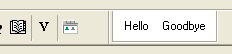
Character. The side of the toolbar that can be docked. The toolbar is initially docked on the specified side. Allowable values are: "Left" "Right" "Bottom" "Top" (default) "Float"= initially undocked but dockable.
Description
The {DOCKABLE} command is used in an Xdialog to turn the modeless xdialog into a dockable toolbar. It can only be used if the xdialog is modeless. i.e. if you use the UI_MODELESS_DLG_BOX()command.
Example
ui_modeless_dlg_box("toolbar",<<%dlg%
{background=White}
{dockable=float}
<%B=T%Hello>
<%B=T%Goodbye!close>
%dlg%,<<%Code%
if a_dlg_button = "close" then
ui_modeless_dlg_close("toolbar")
end if
%code%)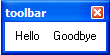
Limitations
Desktop applications only
See Also