Xbasic
{IMAGE_OPAQUE}
Syntax
{IMAGE_OPAQUE= Image_Name }
Arguments
- Image_Name
Character. The name of a built-in Alpha Anywhere bitmap, a bitmap that you have added to the current database (on the Code tab of the Control Panel ), one that you have loaded with UI_BITMAP_CREATE(), or an image loaded from a file.
Description
The {IMAGE_OPAQUE} command displays a bitmap (.BMP) image. This command is to be used with opaque images that are drawn at the same time as the background.
Example
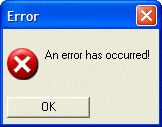
In this example, we display the Windows error icon in a text box.
ui_dlg_box("Error",<<%dlg%
{lf};
{image_opaque=$sys_error}  An error has occurred! ;
{lf};
<*15&OK>
%dlg%)
This script produces this dialog:
This example allows you to select and display a .BMP or .JPG image.
dim Pix_In as C
dim result as L = .f.
dim ibuffer as B
ui_dlg_box("Scale Image",<<%dlg%
{lf};
[%fImage files(*.bmp;*.jpg)%.52Pix_In!pixin];
{lf};
{image_opaque=temp_in};
{lf};
;
%dlg%,<<%code%
if (a_dlg_button = "pixin") then
    ibuffer = file.to_blob(Pix_In)
    ui_bitmap_load("temp_in", ibuffer)
    a_dlg_button = ""
end if
%code%)
This example allows you load and scale a .BMP image.
dim Pix_Out as C = ""
dim Pix_In as C = ""
dim cmode as C = "Percentage"
dim mode as N
dim HSize as N
dim VSize as N
dim result as L = .f.
dim ibuffer as B
dim obuffer as B
ui_dlg_box("Scale Image",<<%dlg%
{font=verdana,10}
{xmargin=2}
{ymargin=1}
{lf};
{region}
Image In |[%fImage files(*.bmp)%.80Pix_In!pixin];
Image Out |[%fImage files(*.bmp)%.80Pix_Out];
{endregion};
{lf};
{region}
{frame=1,2:Scale Mode}(cmode:Measurement) (cmode:Percentage) | | {frame=1,2:New Size}Width [.10HSize] Height [.10VSize];
{lf};
{embedded=%S%80,20preview_in} |{sp=2}| {embedded=%S%80,20preview_out};
{endregion}
{lf};
;
%dlg%,<<%code%
IF (a_dlg_button = "Close") THEN
    ui_bitmap_drop("temp_in")
    ui_bitmap_drop("temp_out")
END IF
IF (a_dlg_button = "pixin") THEN
    ibuffer = file.to_blob(Pix_In)
    ui_bitmap_load("temp_in", ibuffer)
    ui_modeless_dlg_box("preview_in","{image_opaque=temp_in};")
    a_dlg_button = ""
END IF
IF (a_dlg_button = "Scale")
    a_dlg_button = ""
    IF (Pix_Out <> "") THEN
        IF (cmode = "Percentage") THEN
            mode = 1
        ELSE
            mode = 2
        END IF
        result = scale_image(Pix_In, Pix_Out, mode, HSize, VSize)
        IF (result = .T.) THEN
            ibuffer = file.to_blob(Pix_Out)
            ui_bitmap_load("temp_out", obuffer)
            ui_modeless_dlg_box("preview_out","{image_opaque=temp_out};")
        END IF
    END IF
END IF
%code%)
FUNCTION scale_image as L (Pix_In as C, Pix_Out as C, Mode as N, HSize as N, VSize as N)
dim ibuffer as B
dim obuffer as B
dim CurrHSize as N
dim CurrVSize as N
scale_image = .f.
if (Pix_in = "") .or. (Pix_Out = "") then
    exit function
end if
if (Mode < 1) .or. (Mode > 2) then
    exit function
end if
if (HSize <= 0) .or. (VSize <= 0) then
    exit function
end if
ibuffer = file.to_blob(Pix_In)
ui_bitmap_load("temp_in", ibuffer)
ui_screen_draw(<<%code%
    CurrHSize = Bitmap_Width("temp_in")
    CurrVSize = Bitmap_Height("temp_in")
%code%)
IF (Mode = 1) THEN                                             ' percentage
    ui_bitmap_drop("temp_out")
    ui_bitmap_create("temp_out", CurrHSize * HSize / 100, CurrVSize * VSize / 100)
    ui_bitmap_draw("temp_out",<<%code%
    bitmap("temp_in", 0, 0, CurrHSize * HSize / 100, CurrVSize * VSize / 100, "STRETCH,OPAQUE,HALFTONE")
%code%)
ELSE                                                                   ' specific dimensions
    ui_bitmap_drop("temp_out")
    ui_bitmap_create("temp_out", HSize, VSize)
    ui_bitmap_draw("temp_out",<<%code%
    bitmap("temp_in", 0, 0, HSize, VSize, "STRETCH,OPAQUE,HALFTONE")
%code%)
END IF
obuffer = ui_bitmap_save("temp_out")
IF (file.from_blob(Pix_Out, obuffer) > 0) THEN
    scale_image = .t.
END IF
END FUNCTION
In this example, we display an image file on disk.
ui_dlg_box("Error",<<%dlg%
{lf};
{image=c:\myimages\imag1.png}  This is an image from a disk file! ;
{lf};
<*15&OK>
%dlg%)
Limitations
Desktop applications only
See Also