Xbasic
{YMARGIN}
Syntax
{YMARGIN= Top, Bottom }
Arguments
- Top
Numeric. The number of lines to use as the top margin of the Xdialog.
- Bottom
Numeric. The number of lines to use as the bottom margin of the Xdialog.
Description
The {YMARGIN} command sets the top and bottom margins of the Xdialog. Unless otherwise specified, the measurement is in terms of the default font, which is Arial 8 point.
Example
For example, the following script adds a margin of 2 rows on the top and bottom, 2 columns on the left, and 4 columns on the right of the dialog:
result=ui_dlg_box("Title",<<%dlg%
{ymargin=2,2}
{xmargin=2,4}
{ysize=2}
First name:| [.32firstname];
Last name:| [.32lastname];
Address 1:| [.32address1];
Address 2:| [.32address2];
City:| [.32City];
State:| [State];
Zip:| [Zip];
{lf};

%dlg%)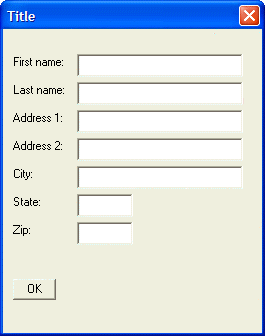
Limitations
Desktop applications only
See Also