Trapping the Change Event
Description
Alpha Anywhere automatically generates an event when a button on a dialog is pushed. In addition to the button push event, it is often necessary to generate an event when the value in a control on a dialog box changes. To do this, you specify the name of the event in the syntax for the control. The syntax for generating a change event for a control is:
[control_definition!event_name]
If you also want to make the control conditional, then the syntax is:
[control_definition!event_name?conditional_flag]
where control_definition is the syntax that defines the control, and event_name is the name of the event that is generated when the variable in the control changes. If conditional_flag is .F., the control is disabled. For example, the following syntax places a text box on a dialog. When the value in the text box changes (i.e. when the value in variable1 changes) an event called value_changed is generated:
[.30variable1!value_changed]
The following script prompts for a user's name and address and then displays a text box showing the address in a mailing label format.
result = ui_dlg_box("Enter Name and Address",<<%dlg%
{ysize=2}
{region}
Firstname: |[.20fname!change] Lastname: [.20lname!change];
Addresss: |[.40address1!change];
{sp}|[.40address2!change];
City: |[.20city!change] State: [.5state!change] Zip: [.10zip!change];
{endregion};
{lf};
{frame=1,1:Address:}
{region}
{text=40,4address_txt}
{endregion};
{region}
<15&Close>
{endregion}
%dlg%,<<%code%
if a_dlg_button = "change" then
    a_dlg_button = ""
    address_txt = alltrim(fname)+" "+alltrim(lname)
    address_txt = address_txt+crlf()+address1
    if address2 <> "" then
        address_txt = address_txt+crlf()+address2
    end if
    if city+state+zip <> ""
        citystzip = alltrim(city)+", "+alltrim(state)+ " "+zip
        address_txt = address_txt+crlf()+     citystzip
    end if
end if
if a_dlg_button = "&Close" then
    if address_txt <> "" then
         a_dlg_button = address_txt
    end if
end if
%code%)
if result <> "&Close" then
    ui_msg_box("Address",result)
end if
The script creates this dialog:
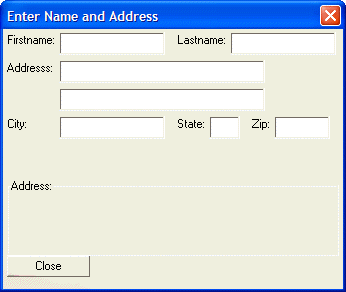
By including the directive '!change' in the definition of each text box in the above script, we have specified that Alpha Anywhere will generate an event (called 'change' ) whenever the value in any of the text boxes is changed by the user. The code starting with the line if a_dlg_button = "change" then is where the 'change' event is handled. Every time the user changes a value in any of the text boxes on the dialog, the script computes the address_txt variable and displays it on the dialog (using the {text} command). When the user presses the Close button, the address_txt variable is assigned to the a_dlg_button variable (as long as address_txt is not NULL). If a_dlg_button is set to a non-null value when the event processing script ends, the dialog closes and the UI_DLG_BOX()function returns the value of a_dlg_button. Since the event handler for the '&Close' event sets a_dlg_button to address_txt, the dialog closes, and sets 'result' to address_txt.
Limitations
Desktop applications only
See Also