Adding Right-Click Context Menus
Description
The following example shows how to respond to right click events.
ui_dlg_box("Right Click",<<%dlg%
{wrap=100}
This Xdialog demonstrates how you can add right-click menu support to different regions on an Xdialog box.;
{lf};
To test, right-click on either of the two fields. Note that each has a different right-click event.;
{lf};
The {rightclick=menu1} statement establishes the right-click menu to call for the name field.
{rightclick=menu1}
{region}
Name: | [.20name];
The {rightclick=menu2} statement overrides the previous statement and establishes the right-click menu to call for the city field.
{rightclick=menu2}
City: | [.20city];
{endregion};
The {rightclick=} statement overrides the previous statement and removes the menu association for the remainder of the dialog box.
{rightclick=}
Now, right-click here. Notice that the right-click event here has no menu. ;
;
%dlg%,<<%code%
if a_dlg_button = "menu1" then
    ui_msg_box("Menu1","User right-clicked")
    a_dlg_button = ""
end if
if a_dlg_button = "menu2" then
    menu = <<%a%
Cut
Copy
Paste
%a%
    result = ui_popup_menu(menu)
    ui_msg_box("Menu2","User selected: " + result)
    a_dlg_button = ""
end if
%code%)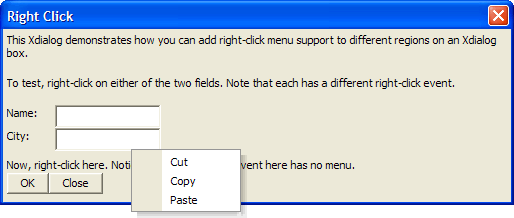
Limitations
Desktop applications only.
See Also