Address Dialog - Margins
Description
Margins are controlled with the {xmargin=} and {ymargin=} commands which specify the right/left margins of the dialog box, and the top/bottom margins of the dialog box. The syntax for commands is:
{Ymargin=top,bottom}
{Xmargin=left,right}
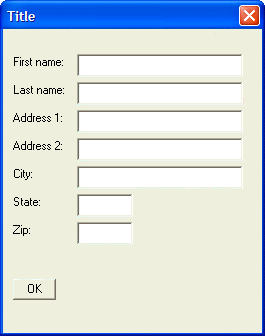
For example, the following script adds a margin of 2 rows on the top and bottom, 2 columns on the left, and 4 columns on the right of the dialog:
result=ui_dlg_box("Title",<<%dlg%
{ymargin=2,2}
{xmargin=2,4}
{ysize=2}
First name:| [.32firstname];
Last name:| [.32lastname];
Address 1:| [.32address1];
Address 2:| [.32address2];
City:| [.32City];
State:| [State];
Zip:| [Zip];
{lf};

%dlg%)
This script creates this dialog:
Limitations
Desktop applications only.
See Also