Bar Graph
Description
This example shows how to use the Microsoft Office Chart ActiveX Control.
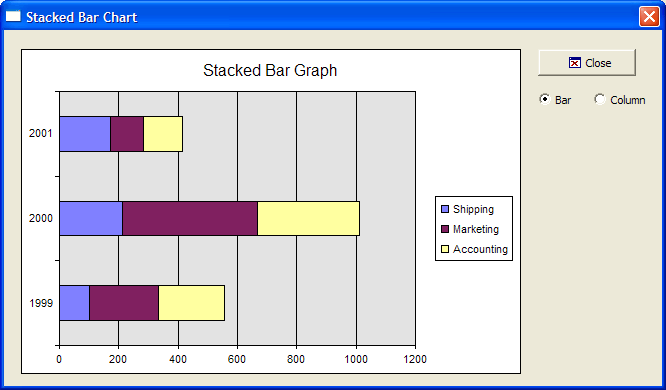
To run this sample Xdialog script, you must have Microsoft Office installed on your machine.
Example
Dimension variables and provide chart data.
dim categories[3] as C
dim shipping[3] as N
dim marketing[3] as N
dim accounting[3] as N
dim vl as P
dim shared Chart as P
dim Graph as P
dim Graph.object as P
dim Graph.class as C
categories[1] = "1999"
categories[2] = "2000"
categories[3] = "2001"
shipping[1] = 100 'value for 'shipping' department in 1999
shipping[2] = 211 'value for 'shipping' department in 2000
shipping[3] = 173
marketing[1] = 234
marketing[2] = 456
marketing[3] = 111
accounting[1] = 222
accounting[2] = 345
accounting[3] = 132
vl = local_variables()
Define the dialog display code.
Graph.class="owc.chart"
dlg_title = "Stacked Bar Chart"
type = 1 'Refer to Complete List of Supported Chart Types
dlg_source = <<%dlg%
{can_exit=close}
{startup=init}
{lf};
{region001}
{stretch=height,width}
{sp}{activex=100,25Graph};
{stretch=}
{stickto=right,top}
{endregion001}
{region002}
{sp}<%i=$a5_window_close;O={J=C} {I=1} Close; %18,1.5&Close!close>{sp};
{lf};
(type:Bar!type_change) (type:Column!type_change);
{endregion002}
%dlg%
Define the dialog event handler code.
dlg_event = <<%code%
if (a_dlg_button = "type_change") then
    if type = 1 then 'bar
        Chart.Type = 4 ' Stacked Bar - Refer to Complete List of Supported Chart Types
        Chart.Title.Caption = "Stacked Bar Graph"
    else if type = 2 then 'column
        Chart.Type = 1 ' Stacked Column- See the list at the bottom for other types.
        Chart.Title.Caption = "Stacked Column Graph"
    end if
end if
if (a_dlg_button = "close") .or. (a_dlg_button = "") then
    ui_modeless_dlg_close(dlg_title)
end if
Create the chart on the init event. SetData()is a chart method.
if (a_dlg_button = "init") then
    a_dlg_button = ""

    ' Add a chart to the graph object
    Chart = Graph.object.Charts.Add()
    Chart.HasTitle = .t.
    Chart.Title.Caption = "Stacked Bar Graph"
    Chart.Type = 4 ' Stacked Bar - refer to Complete List of Supported Chart Types.
    Chart.HasLegend = .t.
    ' Add the two series
    dim series[3] as P
    Series[1] = Chart.SeriesCollection.Add()
    Series[1].Caption = "Shipping"
    Series[1].SetData(1, -1, categories) 'Only need to set 'categories' for the first data series
    Series[1].SetData(2, -1, shipping) ' Refer to  XY Graph

Series[2] = Chart.SeriesCollection.Add()
Series[2].Caption = "Marketing"
Series[2].SetData(2, -1, marketing) ' Refer to XY Graph
Series[3] = Chart.SeriesCollection.Add()
Series[3].Caption = "Accounting"
Series[3].SetData(2, -1, accounting) ' Refer to XY Graph
Graph.object.Refresh()
end if
%code%
ui_modeless_dlg_box(dlg_title, dlg_source, dlg_event)
Limitations
Desktop applications only.
See Also