Anchor Buttons - Advanced Example
Description
This script demonstrates several features of buttons. First, buttons can have "anchor" spots in them which allow you to break a single physical button into multiple "logical" buttons.
dim shared cl_id as C
dim shared varC_result as C
dim descending_icon as C
dim ascending_icon as C
dim image as C
dim a_buttons[3] as P
dim sort_by as C
dim sort_direction as C
delete a_cl_id
dim a_cl_id[1] as C
dim buttons as C
descending_icon = "{I:'a5_sort_12_ascending'}"
ascending_icon = "{I:'a5_sort_12_descending'}"
dim lv as P
lv = local_variables()
sort_by = "lastname"
sort_direction = "D"
get_data(lv)
a_buttons[1].anchor = "Customer_id"
a_buttons[1].underline_flag = .f.
a_buttons[1].bold_flag = .f.
a_buttons[1].label = "Customer Id"
a_buttons[1].tabstop = ""
a_buttons[1].direction = ""
a_buttons[2].anchor = "firstname"
a_buttons[2].underline_flag = .f.
a_buttons[2].bold_flag = .f.
a_buttons[2].label = "First Name"
a_buttons[2].tabstop = "1"
a_buttons[2].direction = ""
a_buttons[3].anchor = "lastname"
a_buttons[3].underline_flag = .f.
a_buttons[3].bold_flag = .t.
a_buttons[3].label = "Last Name"
a_buttons[3].tabstop = "2"
a_buttons[3].direction = "D"
'this function generates a string called 'buttons' of this form:
'buttons = "{C=Dark Blue}{B=Win3D}{A=customer_id}{F=arial,8}Customer_Id{T=1}{A=Firstname}{F=arial,8}First Name{T=2}{F=arial,8,b}{A=Lastname}Last Name"
generate_buttons(lv)
dim current_anchor as C
dim tempIndx as N
ok_button_label = "&OK"
cancel_button_label = "&Cancel"
varC_result = ui_dlg_box("Alpha Anywhere",<<%dlg%
{watch=ui_dlg_control_anchor_from_pos("Alpha Anywhere")!mouse_move}
{region}
{font=Tahoma,8}
{wrap=60}
Click on the column heading to sort the data in the list box.;
When the mouse is over the button, the button text is underlined.;
The column that is currently sorted is shown in bold. Click on a column a second time to toggle the sort direction.;
{line=1,0};
<%O={@@};B=M%30=buttons!click>;
[%d;O={@@}%.60,20cl_id^#a_cl_id];
{endregion};
{line=1,0};
{region}
<*15=ok_button_label!OK> <15=cancel_button_label!CANCEL>
{endregion};
%dlg%,<<%code%
Event handling code.
if a_dlg_button = "mouse_move" then
    a_dlg_button = ""
    current_anchor = ui_dlg_control_anchor_from_pos("Alpha Anywhere")
    'find the array index for the anchor that currently has focus -- i.e. anchor 1, 2 or 3
    tempIndx = a_buttons.find(ut(current_anchor), "ut(anchor)")
    'reset the underline_flag for each array entry to .f.
    for i = 1 to a_buttons.size()
        a_buttons[i].underline_flag = .f.
    next i
    if tempIndx > 0 then
        'now turn on the underline_flag for the anchor that currenty has focus.
        a_buttons[tempIndx].underline_flag = .t.
    end if
    'and now, regenerate the owner draw button string.
    generate_buttons(lv)
end if
if a_dlg_button = "click" then
    'find out which anchor in the button the user clicked on
    sort_by = ui_dlg_control_anchor_from_pos("Alpha Anywhere")
    tempIndx = a_buttons.find(ut(sort_by),"ut(anchor)")
    if tempIndx = 0 then 'do nothing
        goto do_nothing
    end if
    'is data currently sorted on this column?
    if a_buttons[tempIndx].direction <> "" then 'yes, it is currently sorted by this column
        if a_buttons[tempIndx].direction = "D" then
            sort_direction = "A"
        else
            sort_direction = "D"
        end if
    else
        sort_direction = "D"
    end if
    get_data(lv)
    for i = 1 to a_buttons.size()
        a_buttons[i].bold_flag = .f.
        a_buttons[i].direction = ""
    next i
    a_buttons[tempIndx].bold_flag = .t.
    a_buttons[tempIndx].direction = sort_direction
    generate_buttons(lv)
    do_nothing:
    a_dlg_button = ""
end if
%code%)
function get_data as v (vars as P)
with vars
    if sort_direction = "D" then
        auto_list_cl_id = table.external_record_content_get("clients","alltrim(Customer_Id)+\"|\"+alltrim(Firstname)+\"|\"+alltrim(Lastname)",sort_by,"")
    else
        auto_list_cl_id = table.external_record_content_get("clients","alltrim(Customer_Id)+\"|\"+alltrim(Firstname)+\"|\"+alltrim(Lastname)","invert("+sort_by+")","")
    end if
    'ui_msg_box("",auto_list_cl_id)
    Dim format as P
    Format.tab_stops=""
    Format.odd_row_color="White"
    Format.even_row_color="Blue White"
    Format.odd_selected_color="Dark Blue"
    Format.even_selected_color="Dark Blue"
    Format.font="Arial,8"
    Format.font_color_unselected="Black"
    Format.font_color_selected="White"
    Format.lastbutton="OK"
    Format.group_size=2
    Format.number_rows=.f.
    Format.alternating_bands=.t.
    'Apply 'owner draw' formatting information to the list
    auto_list_cl_id = a5_owner_draw_list_fmt(auto_list_cl_id,Format)
    temp_count = w_count(auto_list_cl_id,crlf())
    a_cl_id.resize(temp_count)
    a_cl_id.initialize(auto_list_cl_id)
end with
end function
function generate_buttons as v (vars as P)
with vars
    buttons = ""
    for i = 1 to a_buttons.size()
        font_spec = ""
        if a_buttons[i].underline_flag = .t. then
            font_spec = font_spec + "U"
        end if
        if a_buttons[i].bold_flag = .t.
            font_spec = font_spec + "B"
        end if
        if font_spec = "" then
            font_spec = "}"
        else
            font_spec = "," + font_spec + "}"
        end if
        if a_buttons[i].direction = "" then
            image = ""
        else if a_buttons[i].direction = "D" then
            image = ascending_icon
        else if a_buttons[i].direction = "A" then
            image = descending_icon
        end if
        buttons = buttons + "{T=" + a_buttons[i].tabstop + "}" + "{A="+a_buttons[i].anchor+"}" + "{F=arial,8" + font_spec + a_buttons[i].label + image
    next i
    buttons = "{C=Dark Blue}{B=Win3D}" + buttons
    end with
end function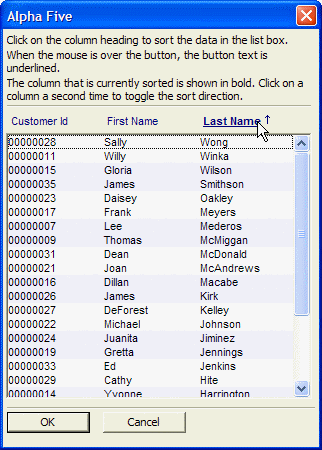
Limitations
Desktop applications only
See Also