Mobile App Development Software
Alpha TransForm
|
Alpha Anywhere - Build Apps for Free
Alpha Software
Documentation
  • User's Guide
  • Desktop
  • Xdialog
  • Controls
  • Buttons
  • Checkboxes and RadioButtons - Columnar Layout
Parent | Child | Previous | Next
  • Add Button Dialog
  • Advanced Buttons
  • Anchor Buttons - Advanced Example
  • Checkboxes and RadioButtons - Columnar Layout
  • Combining Text and Bitmaps on Buttons
  • Creating a Button that Calls an Action Script
  • Creating a Button that Calls an Xbasic Script
  • Creating a Button with a Bitmap
  • Creating and Using a Multi-state Button
  • Creating Buttons that Run Code
  • Creating Buttons the Easy Way
  • Dynamic Buttons
  • Enabling the X Button to Close
  • Menu Style Buttons
  • Placing a Button on a Form
  • Placing Buttons into Browses
  • Putting a Button on the Dialog
  • Putting Bitmaps on Buttons
  • Putting Table Navigation Buttons on Your Form
  • Radio Buttons
  • Setting Choices for Multi-State Buttons
  • Setting the Button Hot Key
  • Setting the Button Width
  • Variable Text on a Button
  • Web Style Buttons
 

Checkboxes and RadioButtons - Columnar Layout

Description

There is an option to lay out the choices in a checkbox or radiobutton group in multiple rows and columns. You can specify the 'snaking' style - left-to-right-then-top-to-bottom, or top-to-bottom-then-left-to-right.

The following image shows radiobutton choices in a mult-column list with the snaking style set to left-to-right.
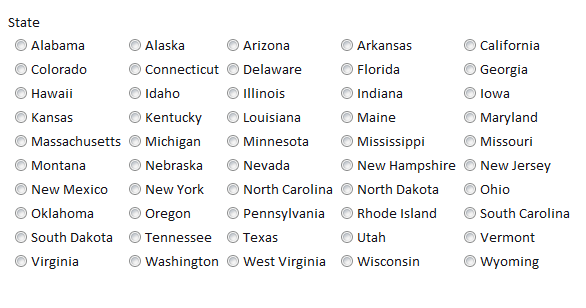
Snakingradiobuttons
Report an issue with this page
Mobile App Development Software

Alpha TransForm - Quickly Build Enterprise Mobile Forms
- Try it for Free

Alpha Anywhere - Low Code Platform for Mobile Developers
- Build Apps for Free
Alpha Software Corporation

781.229.4500
© Copyright 2000-2020 Alpha Software Corporation. All Rights Reserved

Privacy Policy