MDI Xdialog Framework
Description
You can take advantage of a technique for creating MDI Xdialogs. Refer to the sample 'Learning Xdialog' database that ships with Alpha Anywhere and refer to the 'mdi_xdialog_frameworkV8' script. The main difference between the new technique, and the technique described here is that in the new technique, a 'context' is established and the menu and toolbar are instantiated in that 'context'. This is done in the Xdialog's OnInit event. It is no longer necessary to instantiate the menus and toolbars in the onactivate event and then destroy them in the ondeactivate event.
This Xdialog box script displays a MDI (Multiple Document Interface) child window. It assumes that you have created a toolbar called MDI_test, and a menu called MDI_test. The toolbar should have at least two buttons called set_title and close.
The event for the set_title button should be Internal Action and the event name should be set_title.
The event for the close button should be close.
The menu has two commands, File > Set window title, and File > Close. The xdialog menu string for this menu is:
File|{DATA=command:set_title}Set window title
File|{DATA=command:close}Close window
Note that the menu action for each of these menu items is the same as for their corresponding action in the toolbar. This script shows that it is possible to launch multiple instances of the MDI child window. Each instance operates independently of the other. The key to the way in which the toolbar and menu events get executed is the function command()defined at the end of this script.
Examples
This function sends the events to the Xdialog box.
dim event_string as C
dim menu_string as C
dim toolbar_string as P
dim message as C
dim pDummy as P
title_var_name = "title_var"+stritran(time(),":","_")
eval(title_var_name) = "Dialog Title"
dlg_title = "@=" + title_var_name
This is how we register a new MDI window class so that it appears in the Window menu and the Window menubar. This function takes three arguments: the class name, the class description, and the class icon.
a5_mdi_windowclass_add("mymdiclass","My Special MDI Window Type","A5_ball_green")
'This is the event handler string for the Top Menu
event_string = <<%code%
if left(a_command,3) = "A5." then
    a5.command(substr(a_command,4) )
    a_command = ""
else if left(a_command,1) = "!" then
    evaluate_template(substr(a_command,2) )
    a_command = ""
else if left(a_command,6) = "addin:" then
    evaluate_template(substr(a_command,7) )
else if left(a_command,8) = "command:" then
    ui_dlg_event(dlg_title,substr(a_command,9) )
else if .not. ("|" $ a_command) then
    this.command(a_command)
    a_command = ""
end if
%code%
menu_string = a5_menu_def_load("MDI_test")
toolbar_string = a5_toolbar_def_load("mdi_test")
message = "This is a standard MDI child window. It can be maximized, minimized, resized, or restored."
ui_modeless_dlg_box(dlg_title,<<%dlg%
{icon=A5_ball_green}
{mdichild=mymdiclass}
{on_activate=activate}
{on_deactivate=deactivate}
{text=50,4:Message};
dlg title .30title!title_change;
%dlg%,<<%code%
if a_dlg_button = "set_title" then
    title = ui_get_text("Title","Enter the text for the Window Title")
    if title <> "" then
        eval(title_var_name) = title
    end if
end if
if a_dlg_button = "activate" then 'show the toolbar
    pDummy.dummy = ""
    toolbar_name = a5_system_toolbar_show(pDummy,toolbar_string)
Show the menu. The UI_EXPAND_BRANCHES() function is used to expand certain menu 'macros' (such as recent file list, or window list) at runtime.
ui_top_menu(ui_expand_branches(menu_string), event_string)
end if
Before closing the toolbar we check to see if it still exists -- the user could have undocked the toolbar and closed it before closing the dialog box.
if a_dlg_button = "deactivate" then
    if ui_modeless_dlg_exist(toolbar_name) then
        ui_modeless_dlg_close(toolbar_name)
    end if
end if
if a_dlg_button = "title_change" then
    eval(title_var_name) = title
end if
if a_dlg_button = "close" then
    ui_modeless_dlg_close(dlg_title)
end if
%code%)
This is the event handler for the toolbar.
function command as v ( vars as P,command as C )
with vars
    if left(command,6) = "event:" then

       command = substr(command,7)
    end if
    ui_dlg_event(dlg_title,command)
    command = ""
end with
end function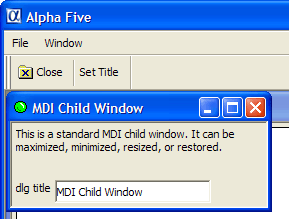
Limitations
Desktop applications only.
See Also