Combo Boxes
Description
Combo boxes are variants on the text box and radio button controls. Like a radio button, a combo box displays a list of values, but it displays the choices in a drop-down text box. You can specify the choices for the combo in one of three ways:
Enclosing a comma separated list between '{' and '}' e.g. {Red,Green,Blue}
By referring to an array that contains the choices
By referring to a string variable that contains a CR-LF delimited list of choices
The syntax for a combo box object is:
[.size variable_name^={choice1,choice2,choiceN}]     or,
[.size variable_name^=choice_variable]     or,
[.size variable_name^=choice_array]
Where choice1, choice2, choiceN are the actual choices, or choice_variable is the name of a string that contains CR-LF delimited choices, or choice_array is the name of a array that contains the choices. The value of variable_name is a base-1 index if the variable is declared as Numeric. If undeclared or left un-initialized, the variable is a string that returns the text of the choice that is selected. The following script demonstrates a combo box in which the choices are explicitly stated by enclosing the choices between the '{' and '}' characters.
mode = "Shared"
result=ui_dlg_box("Title",<<%dlg%
Filename:| [.32filename];
Open as:;
Mode:| [.10 mode^={Shared,Read only,Exclusive}];

%dlg% )
This script creates this dialog, Combo Boxes:
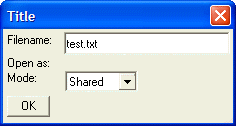
Combo Boxes - Populated from a String
The following script is identical to the previous script, except that the choices displayed by the combo box come from a variable, which contains a CR-LF delimited list of choices. In addition, mode is declared as a numeric variable. Therefore, the dialog box will set its value to 1, 2, or 3.
mode = 1
choices = <<%dlg%
Shared
Read only
Exclusive
%dlg%
result=ui_dlg_box("Title",<<%dlg%
Filename:| [.32filename];
Open as:;
Mode:| [.10 mode^=choices];

%dlg% )
Limitations
Desktop applications only.
See Also